
Epson L8050 Resetter Software: Complete Printer Maintenance Solution
Professional Epson L8050 resetter software that gives you complete control over your printer’s maintenance functions and error resets. This comprehensive tool allows you to bypass service center requirements and perform critical maintenance procedures yourself, saving time and money on printer servicing.
With unlimited usage on any computer, this software provides permanent access to essential Epson L8050 maintenance features, including waste ink pad counter resetting, EEPROM editing, head cleaning cycles, and advanced printer adjustments that are typically restricted to authorized service technicians.
Complete Feature Overview
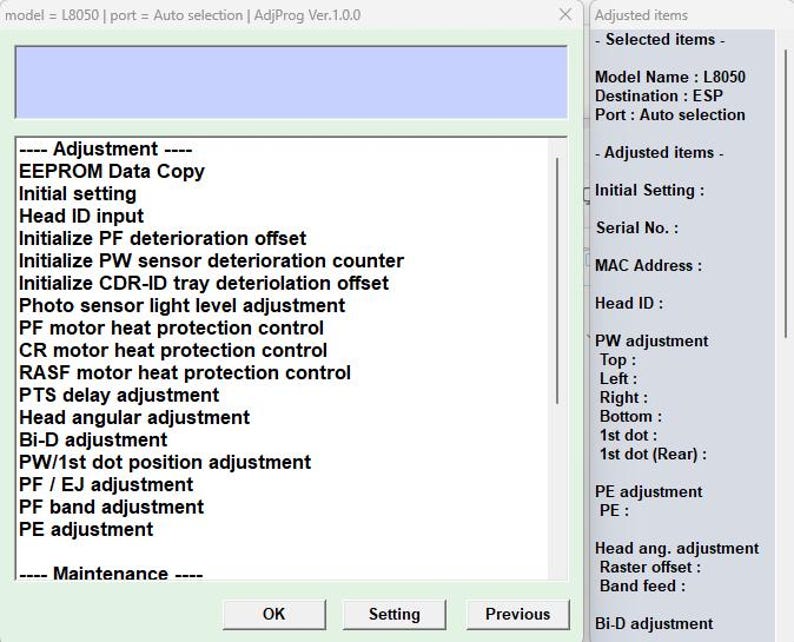
Modification & Adjustment Functions
- EEPROM Data Copy: Backup and restore printer configuration data
- Head ID Input: Register and configure print head identification
- Boot-up PF Damage Counter: Reset paper feed mechanism counters
- Boot-up PW Sensor Damage Counter: Reset paper width sensor counters
- Initial Setting CDR-ID Tray Damage Counter: Reset tray mechanism counters
- Image Sensor Light Level Adjustment: Calibrate optical sensor sensitivity
- PF Motor Thermal Protection Control: Adjust paper feed motor temperature settings
- CR Motor Thermal Protection Control: Adjust carriage motor temperature protection
- RASF Motor Thermal Protection Control: Adjust rear auto sheet feeder motor settings
- PTS Delay Adjustment: Fine-tune paper timing sensor delays
- Head Angular Adjustment: Calibrate print head alignment
- Bi-D Adjustment: Bidirectional printing alignment calibration
- PW/First Dot Placement Adjustment: Paper width and initial dot positioning
- PF/EJ Adjustment: Paper feed and ejection timing
- PF Band Adjustment: Paper feed mechanism belt tension
- PE Adjustment: Paper edge detection calibration
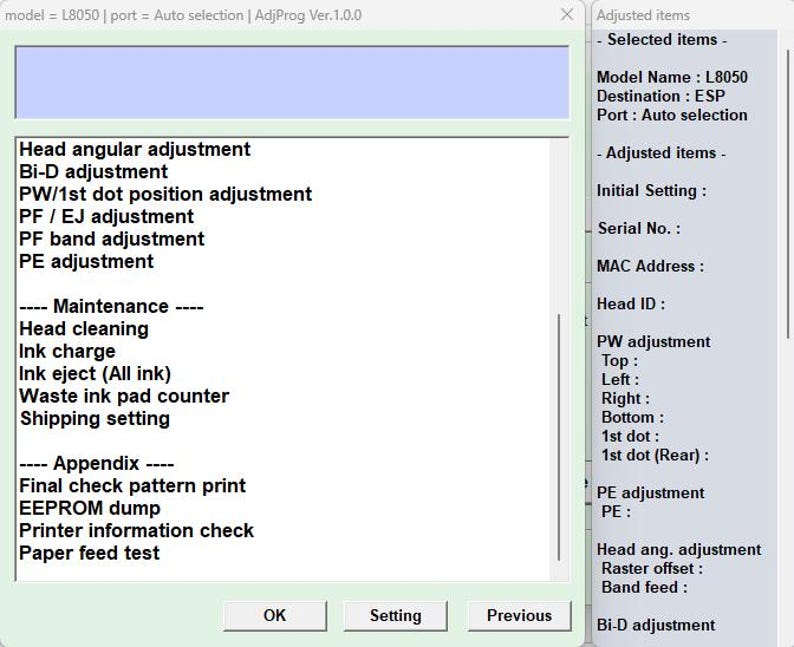
Maintenance Functions
- Head Cleaning: Perform manual print head cleaning cycles
- Ink Charge: Prime ink system and charge ink lines
- Ink Eject (All Ink): Purge all ink from system for maintenance
- Waste Ink Pad Counter Reset: Critical function – reset waste ink counter to zero
- Shipping Settings: Configure printer for transport and storage
Appendix & Diagnostic Functions
- Last Check Pattern Print: Print diagnostic patterns for alignment verification
- EEPROM Dump: Extract and save complete EEPROM data
- Printer Info Check: Display comprehensive printer status and configuration
- Paper Feed Check: Test and diagnose paper feeding mechanisms
Key Benefit: Waste Ink Pad Counter Reset
The most valuable feature of this software is the ability to reset the waste ink pad counter. When Epson printers reach a predetermined waste ink limit, they enter a service mode that requires authorized technician reset. This software allows you to:
- Reset counter to zero without service center visit
- Continue using printer after pad replacement
- Monitor waste ink levels proactively
- Extend printer lifespan significantly
- Save hundreds in service fees over printer lifetime
Who Needs This Software?
Professional Users
- Print shops and service centers
- Graphic design studios
- Photography businesses
- Sign and banner production companies
- Textile printing operations
Heavy Home & Office Users
- Small business owners with high-volume printing
- Home-based businesses using L8050 for production
- Educational institutions with multiple printers
- Non-profits and community organizations
- Photography enthusiasts with regular printing needs
System Requirements & Compatibility
- Printer Model: Epson L8050 specifically
- Computer OS: Windows 7, 8, 10, 11 (32-bit and 64-bit)
- Connection: USB connection to printer
- Administrator Rights: Required for software installation
- Unlimited Usage: Works on any computer – no activation limits
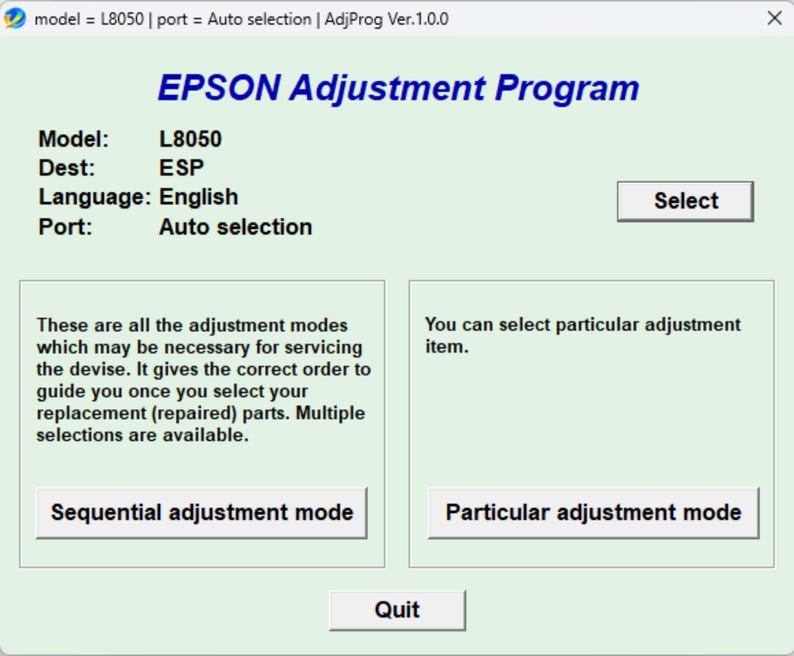
How It Works: Simple Process
- Install the resetter software on your Windows computer
- Connect Epson L8050 printer via USB cable
- Run the software and select desired function
- Follow on-screen instructions for each procedure
- Complete maintenance without external assistance
- Save software for future use (unlimited usage)
Cost Savings Analysis
Service Center Comparison
- Service Center Visit: $100-$200 per reset + downtime
- Printer Transportation: Risk of damage during transport
- Business Downtime: Lost productivity during service
- Repeat Costs: Multiple resets needed over printer life
Software Solution
- One-time Purchase: Permanent access to all functions
- Immediate Resolution: Reset counters in minutes
- No Downtime: Printer remains in your location
- Multiple Uses: Unlimited resets over printer lifetime
- Additional Functions: Access to all maintenance features
Safety & Precautions
Important Considerations
- Always replace waste ink pads before resetting counter
- Follow proper maintenance procedures for ink system
- Backup EEPROM data before making changes
- Ensure stable power during EEPROM operations
- Use genuine or high-quality replacement parts
Waste Ink Management
Resetting the counter without replacing saturated waste ink pads can cause:
- Ink leakage and internal damage
- Electrical shorts and component failure
- Voided warranty (if applicable)
- Environmental contamination
Common Use Cases
Regular Maintenance
Perform monthly maintenance to keep printer in optimal condition:
- Head cleaning to prevent clogging
- Ink system charging after periods of non-use
- Periodic alignment checks
- Sensor calibration
Error Resolution
Fix common L8050 errors without service intervention:
- “Service Required” messages
- Waste ink full errors
- Paper feed issues
- Print quality problems
- Mechanical error codes
Technical Support & Documentation
Included Resources
- Software installation guide
- Function reference manual
- Troubleshooting guide for common issues
- Safety precautions and best practices
Recommended Knowledge Level
While designed to be user-friendly, this software is intended for:
- Users comfortable with technical software
- Those who follow instructions carefully
- Individuals with basic printer maintenance knowledge
- Users willing to learn proper procedures
Frequently Asked Questions
Is this software legal to use?
Yes, this software is legal for personal and business use to maintain your own equipment. It does not circumvent copy protection or enable illegal activities.
Will it void my printer warranty?
Using third-party maintenance software may void remaining manufacturer warranty. Check your warranty status before use.
How many times can I use the software?
Unlimited usage on any computer. There are no activation limits or usage restrictions.
Do I need technical expertise to use it?
Basic computer literacy is sufficient. The software has clear menus and instructions for each function.
Can I use it on multiple L8050 printers?
Yes, the software works with any Epson L8050 printer. You can maintain multiple units with a single purchase.
What if I encounter problems?
The software includes troubleshooting guidance. For persistent issues, ensure proper USB connection and printer power status.
Installation & Setup Guide
- Download the software package
- Extract files to a folder on your computer
- Run the installer with administrator privileges
- Connect Epson L8050 via USB (printer powered on)
- Launch the software from desktop shortcut
- Select language preference if prompted
- Choose from main function categories
- Follow specific procedure instructions
Why Choose This Solution?
Complete Control
Take control of your printer maintenance instead of depending on service centers with scheduling delays and high costs.
Cost Effective
One-time purchase provides lifetime access to all maintenance functions, paying for itself with the first use.
Time Saving
Immediate access to reset functions means minimal printer downtime and continuous productivity.
Comprehensive Toolset
Beyond basic reset functions, access advanced calibration and adjustment features typically restricted to technicians.
Important Disclaimer
This software is for maintaining your own Epson L8050 printer. Users assume all responsibility for proper use. Always follow safety guidelines and replace consumable parts (waste ink pads) as needed. The software developer is not responsible for printer damage from improper use or failure to follow instructions.
This is a digital software product delivered via download. No physical items are shipped. Due to the nature of digital software, all sales are final.





Reviews
There are no reviews yet.