


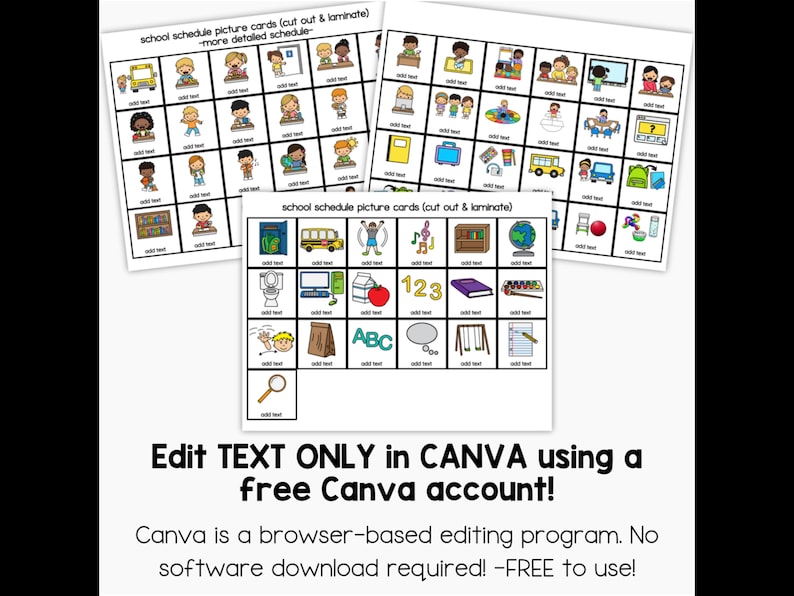
Never face a challenging schedule transition without support again! Our editable portable visual schedule lanyard is the perfect on-the-go solution for teachers, paraprofessionals, and special education professionals who need visual supports available at all times. This innovative portable visual schedule attaches directly to your lanyard, keeping crucial visual supports literally at your fingertips wherever you go in the school building.
Perfect for preschool, pre-k, elementary special education, and any classroom setting where students benefit from visual scheduling and transition support!
What Makes This Portable Visual Schedule Special?
Always Accessible:
- Attaches to your teacher lanyard
- No more running back to classroom for visuals
- Available during transitions in hallways
- Perfect for specials (gym, art, music, library)
- Ready for unexpected schedule changes
- Portable for field trips and outings
Fully Editable in Canva: Unlike pre-printed visual schedules, customize everything to match your students’ specific needs and your classroom vocabulary.
Two Assembly Methods: Choose the setup that works best for your needs:
- Velcro Method – Flexible for frequent schedule changes
- Permanent Method – Glue/tape and laminate for fixed schedules
Durable & Practical: Designed to withstand daily use while being easy to update and maintain.
What’s Included – Complete Portable Schedule System
Tabbed Cards in 6 Colors:
- Color-coded organization system
- Edit tabs with activity names OR numbers
- Mix and match colors as needed
- Professional, easy-to-read design
- Coordinates with classroom visuals
Picture Schedule Cards (3 Types):
1. Pre-Labeled Picture Cards (Non-Editable Images): Ready-to-use cards for common activities:
- Arrival/Morning Meeting
- Circle Time
- Centers/Stations
- Reading Time
- Math Time
- Writing
- Snack Time
- Lunch
- Recess
- Bathroom Break
- Transitions
- Specials (Art, Music, PE, Library)
- Small Group
- Independent Work
- Sensory Break
- Computer Time
- Dismissal
- And more!
2. Text-Editable Picture Cards: Same images, but customize the text labels:
- Use your specific classroom vocabulary
- Match your school’s terminology
- Adjust for different languages
- Personalize for individual students
- Create multiple versions for different needs
3. Image & Text Template Cards: Create completely custom cards:
- Upload your own photos
- Use Canva graphics library
- Add real pictures of your classroom
- Include photos of actual locations in your school
- Create student-specific visuals
- Add photo symbols students recognize
Assembly Instructions:
- Step-by-step visual guide
- Instructions for Velcro method
- Instructions for permanent/laminated method
- Tips for durability
- Lanyard attachment guidance
Canva Usage Guide:
- How to access your template
- Editing instructions
- Adding text and graphics
- Downloading and printing
- Troubleshooting tips
Fully Customizable Features
ALL TEXT is Editable:
Tabbed Cards Customization:
- Label by activity names (Reading, Math, Art, etc.)
- Label by numbers (1, 2, 3, 4, etc.) for flexible scheduling
- Use student names for individual schedules
- Add time indicators if needed
- Create bilingual labels
Picture Card Text:
- Change activity names to match your vocabulary
- Add student-specific terminology
- Use simplified language for younger learners
- Include visual supports in text (icons/emojis)
- Create multiple language versions
Create Your Own Cards:
- Upload personal photos
- Use Canva’s free graphics
- Photograph your classroom areas
- Include pictures of staff members
- Add location-specific images
Perfect For
Educational Settings:
- Special education classrooms (self-contained)
- Inclusive general education classrooms
- Resource rooms
- Preschool and pre-k programs
- Kindergarten classrooms
- Early elementary grades
- Autism support classrooms
- Behavioral support programs
Student Populations:
- Students with autism spectrum disorder
- Children with ADHD
- Students with anxiety
- Learners with processing disorders
- English Language Learners (ELL)
- Students with developmental delays
- Visual learners
- Children who struggle with transitions
Professional Roles:
- Special education teachers
- Paraprofessionals and aides
- General education teachers
- Behavior specialists
- Speech-language pathologists
- Occupational therapists
- School psychologists
- Related service providers
Benefits of Portable Visual Schedules
For Students: ✓ Reduces anxiety about transitions ✓ Provides predictability and structure ✓ Supports independence during movement ✓ Decreases challenging behaviors ✓ Builds confidence in new environments ✓ Improves ability to follow routines ✓ Enhances understanding of expectations
For Educators: ✓ Always have visual supports available ✓ Support students anywhere in building ✓ Reduce behavioral incidents during transitions ✓ Quick reference during unexpected changes ✓ Professional, organized appearance ✓ Easy to update as schedules change ✓ Share strategies with substitutes
For Inclusive Settings: ✓ Support students in mainstream environments ✓ Discreet, portable accommodation ✓ Bridge between special education and general education ✓ Enable participation in school-wide activities ✓ Facilitate successful integration
Two Assembly Methods Explained
Method 1: Velcro System (Flexible)
Best for:
- Schedules that change frequently
- Students with varying daily routines
- Multiple students using same cards
- Trial periods to find best sequence
Assembly:
- Print and cut tabbed cards
- Laminate tabbed cards
- Print and cut picture cards
- Laminate picture cards
- Add Velcro dots to both
- Attach to lanyard
- Change cards as needed
Benefits:
- Adapt to schedule changes instantly
- Reorder activities easily
- Remove completed activities
- Add unexpected activities
- Use same cards for multiple students
Method 2: Permanent Assembly (Fixed)
Best for:
- Consistent daily schedules
- Individual student schedules
- Long-term use without changes
- Maximum durability
Assembly:
- Print tabbed cards
- Print picture cards
- Glue or tape cards to tabs
- Laminate entire assembled schedule
- Trim edges
- Punch hole and attach to lanyard
Benefits:
- More durable construction
- Cards won’t get lost
- Sleeker appearance
- Less maintenance required
- Simpler for students to use
How to Use Your Portable Visual Schedule
Daily Classroom Use:
- Wear on lanyard throughout the day
- Reference during transitions
- Show students what’s coming next
- Point to current activity
- Preview upcoming schedule changes
Hallway Transitions:
- Show schedule while walking to destinations
- Reduce transition anxiety
- Remind students of expectations
- Reference when behaviors escalate
- Provide visual support in real-time
Specials & Outside Classroom:
- Show schedule before leaving room
- Reference during art, music, PE, library
- Support transitions between activities
- Help students anticipate return to classroom
- Provide consistency across environments
Unexpected Changes:
- Quickly show modified schedule
- Support students during fire drills
- Help during assemblies or special events
- Reduce anxiety about changes
- Provide predictability in unpredictability
Individual Student Support:
- Pull aside for one-on-one reference
- Use during behavior interventions
- Review before challenging activities
- Celebrate completed tasks
- Build independence gradually
Color-Coding System Ideas
By Activity Type:
- Blue: Academic subjects
- Green: Specials (art, music, PE)
- Yellow: Breaks and transitions
- Orange: Social activities
- Purple: Self-care (bathroom, snack)
- Pink: End of day routines
By Time of Day:
- Morning activities: Light colors
- Midday activities: Medium colors
- Afternoon activities: Darker colors
By Student Preference:
- Favorite activities: Preferred colors
- Challenging activities: Calming colors
- Neutral activities: Standard colors
By Location:
- Classroom activities: One color
- Outside classroom: Another color
- Building-wide: Third color
Customization Ideas
For Individual Students:
- Use actual photos of the student doing activities
- Include preferred items or rewards
- Add personal motivators
- Use student’s name on tabs
- Create first/then sequences
For Different Schedules:
- Make Monday schedule set
- Create Friday routine set
- Build special schedule (half days, field trips)
- Design substitute teacher schedule
- Prepare early dismissal version
For Various Needs:
- Create picture-only version (no text)
- Make word-only cards for readers
- Design bilingual schedules
- Add numbers for counting activities
- Include time stamps if helpful
For Multiple Students:
- Color-code by student
- Create student-specific sets
- Make group schedule for small groups
- Design individual accommodation versions
- Build differentiated visual supports
Why Teachers Love This Portable Schedule
“Game changer for transitions! My student with autism uses this to successfully move between all his classes.”
“Finally – visual supports I can actually have with me everywhere! No more panicking in the hallway.”
“The editable feature is perfect. I use real photos of our classroom areas and my student responds so much better!”
“I made one for each of my paraprofessionals. Now we all have consistent visual supports wherever students need them.”
“Worth every penny. Reduced meltdowns by at least 50% just by having this available during transitions.”
Technical Specifications
Editing Platform: Canva (free account required) File Format: PDF with Canva link Card Size: Designed to fit standard lanyards Colors: 6 color options for tabbed cards Printing: Standard home or school printer Materials Needed:
- Cardstock (recommended)
- Laminator and pouches
- Velcro dots (for flexible method)
- Glue or tape (for permanent method)
- Hole punch
- Lanyard or badge reel
About Canva Editing
What’s Editable:
- All text boxes and labels
- Tab titles
- Picture card text
- Custom card creation
What’s Not Editable:
- Existing graphics and clipart (copyright protected)
- Pre-designed layouts
- Background elements
- Font styles of existing text
What You Can Add:
- New text boxes anywhere
- Free Canva graphics
- Your own uploaded images
- Shapes and design elements
- Additional pages as needed
Educator Benefits: With a free Canva Educator account, access all Pro elements and fonts for personal classroom use!
Terms of Use
Personal, Non-Commercial Use Only:
You MAY: ✓ Print unlimited copies for your classroom ✓ Create multiple versions for different students ✓ Laminate and reuse year after year ✓ Share with paraprofessionals in your classroom ✓ Use for your homeschool students ✓ Adapt for individual student needs
You MAY NOT: ✗ Resell or redistribute this product ✗ Share Canva template links with others ✗ Use in resources meant for commercial sale ✗ Profit from this product in any way ✗ Post template files publicly online ✗ Share with other teachers (they must purchase their own)
Important Information
Digital Product Notice: This is a DIGITAL DOWNLOAD. No physical product will be shipped. You must have access to your own printing resources.
Instant Access: After purchase, immediately receive:
- PDF file with Canva link
- Download link sent to registered email
- Access through your account dashboard
- Begin customizing right away
Printing Variations: Colors may slightly vary due to:
- Monitor display settings
- Printer type and quality
- Paper and cardstock used
- Ink or toner variations
Canva Account Required:
- Free account creation at canva.com
- No software download needed
- Online graphic design platform
- Works on computer, tablet, or phone
No Refunds: This product is non-refundable. If you have questions before purchase, please message me!
Assembly Tips & Recommendations
Materials for Best Results:
- Heavy cardstock (110 lb recommended)
- Quality laminating pouches (5 mil minimum)
- Industrial-strength Velcro dots
- Corner rounder for safety
- Reinforced hole punch
- Sturdy lanyard or badge reel
Durability Tips:
- Laminate all components
- Use corner rounders on sharp edges
- Reinforce hole punch area
- Consider badge reel instead of lanyard ring
- Store flat when not in use
- Make backup sets
Organization:
- Label Velcro pieces clearly
- Store extra cards in small pouch
- Keep backup on lanyard
- Organize by student or schedule type
- Create storage system for multiple sets
Also Available: Visual Support Bundle
Looking for comprehensive visual supports? Check out our Visual Support Bundle for additional tools that coordinate with this portable schedule!

Get Started Supporting Students Everywhere
Don’t let transitions derail your students’ success! With this editable portable visual schedule lanyard, you’ll have the tools you need to support students anywhere in the school building. Reduce anxiety, prevent behavioral incidents, and build independence – all while having professional visual supports literally at your fingertips.
Perfect for: ✓ Special education teachers on the go ✓ Paraprofessionals supporting multiple students ✓ General education teachers with included students ✓ Related service providers (SLP, OT, etc.) ✓ Behavior specialists ✓ New teachers building visual support systems
Download your Editable Portable Visual Schedule now and transform how you support students during transitions!
Instant digital download • Fully editable in Canva • 6 colors • 2 assembly methods • Always accessible on your lanyard

Reviews
There are no reviews yet.