
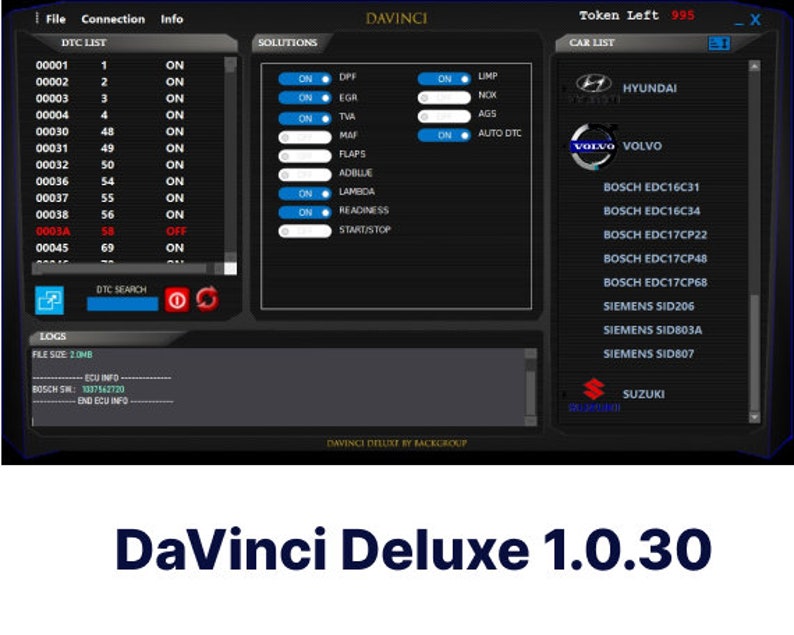
Davinci Deluxe V1.0.35 is the ultimate professional chiptuning and ECU remapping software for automotive specialists and tuning enthusiasts. This advanced software solution enables efficient removal and optimization of FAP/DPF, EGR, DTC, intake flaps, and AdBlue systems, giving you complete control over vehicle performance tuning.
Designed for chiptuning professionals and remapping specialists, Davinci Deluxe provides powerful ECU optimization capabilities with extensive compatibility across industry-leading tuning tools.
Key Features of Davinci Deluxe Chiptuning Software
Advanced Removal Capabilities:
- DPF/FAP Removal – Eliminate diesel particulate filter restrictions
- EGR Delete – Disable exhaust gas recirculation systems
- DTC Clearing – Remove diagnostic trouble codes
- Intake Flaps Control – Manage intake manifold flap systems
- AdBlue Removal – Disable selective catalytic reduction (SCR) systems
ECU Optimization Tools:
- Complete ECU reprogramming capabilities
- Performance tuning and optimization
- Fuel consumption improvement
- Power and torque enhancement
- Engine efficiency optimization
Professional-Grade Software:
- User-friendly interface for efficient workflow
- Advanced tuning parameters and controls
- Comprehensive vehicle coverage
- Regular updates and improvements
- Reliable and stable performance
Compatible Tuning Tools & Hardware
Davinci Deluxe chiptuning software works seamlessly with popular ECU programming tools:
✓ KT200 – Full read/write support ✓ FoxFlash – Complete compatibility ✓ PCMTuner – Integrated functionality ✓ Autotuner – Seamless operation ✓ Kess V2 – Full feature support ✓ Ktag – Complete integration ✓ MPPS – Full compatibility
This extensive compatibility makes Davinci Deluxe the versatile choice for professional tuning workshops equipped with multiple programming tools.
Performance Optimization Benefits
Power Enhancement:
- Increase horsepower and torque output
- Improve throttle response and acceleration
- Optimize engine performance characteristics
- Remove factory electronic limitations
Efficiency Improvements:
- Reduce fuel consumption
- Optimize air-fuel ratios
- Improve engine breathing
- Enhance combustion efficiency
System Optimization:
- Eliminate restrictive emissions components
- Remove performance-limiting systems
- Improve exhaust flow
- Optimize engine management parameters
Perfect For
Professional Users:
- Chiptuning specialists and workshops
- ECU remapping professionals
- Automotive performance shops
- Diesel tuning experts
- Mobile tuning services
Vehicle Applications:
- Passenger cars (petrol and diesel)
- Commercial vehicles and vans
- Trucks and heavy-duty vehicles
- Agricultural and construction equipment
- Performance and racing vehicles
System Requirements
Operating System Compatibility:
- Windows 7 (32-bit and 64-bit)
- Windows 10 (all versions)
- Windows 11 (latest updates)
Minimum Requirements:
- Processor: Intel Core i3 or equivalent
- RAM: 4GB minimum (8GB recommended)
- Storage: 10GB available space
- Internet connection for download and activation
Installation Instructions
IMPORTANT – Before Installation:
- Disable Windows Security:
- Go to Windows Security settings
- Turn OFF all virus & threat protection
- Disable real-time protection temporarily
- This prevents false positive detections
- Download & Install:
- Complete your purchase
- Receive download link via email
- Download the installation package
- Run installer as Administrator
- Configure Software:
- Follow on-screen installation prompts
- Connect your compatible tuning tool
- Launch Davinci Deluxe software
- Begin ECU tuning and optimization
Note: Antivirus software may flag tuning software due to its system-level access. This is normal for professional ECU tools. Always download from trusted sources.
How Davinci Deluxe Works
Step 1: Connect Your Tool Connect your compatible ECU programming tool (KT200, Kess, Ktag, etc.) to the vehicle’s OBD port.
Step 2: Read ECU Data Use Davinci Deluxe chiptuning software to read the original ECU file from the vehicle.
Step 3: Select Modifications Choose which systems to remove or optimize:
- DPF/FAP removal
- EGR delete
- DTC clearing
- AdBlue removal
- Custom tuning parameters
Step 4: Process & Write The software automatically processes the ECU file with your selected modifications, then write the optimized file back to the vehicle.
Step 5: Test & Verify Start the vehicle and verify proper operation. All warning lights related to removed systems will be cleared.
Why Choose Davinci Deluxe?
Professional Solution: Unlike basic tuning software, Davinci Deluxe offers comprehensive removal and optimization features specifically designed for professional chiptuning work.
Time-Saving Efficiency: Automated processes reduce tuning time from hours to minutes, allowing you to serve more customers and increase workshop productivity.
Reliable Results: Proven algorithms ensure safe and effective ECU modifications without risking engine damage or drivability issues.
Extensive Compatibility: Support for multiple tuning tools means you can use Davinci Deluxe regardless of your existing hardware investment.
Cost-Effective: One-time purchase provides lifetime access to professional-grade tuning capabilities without subscription fees.
Important Information
Product Type: Digital software download Delivery Method: Download link sent via email after purchase License: Single-user license Updates: Compatible with current version (V1.0.35)
Legal Notice: This software is intended for off-road, racing, and export vehicles only. Users are responsible for ensuring compliance with local emissions and vehicle modification regulations. Removing emissions control systems may not be legal in all jurisdictions.
Technical Support: We provide installation guidance and basic technical support. Advanced tuning knowledge is recommended for optimal use of this professional software.
No Returns: As this is a digital software product, all sales are final. Please ensure compatibility with your tuning equipment before purchase.
Frequently Asked Questions
Q: Will this work with my tuning tool? A: Davinci Deluxe is compatible with KT200, FoxFlash, PCMTuner, Autotuner, Kess, Ktag, and MPPS. Check your specific tool model for compatibility.
Q: Do I need tuning experience? A: Basic ECU reading/writing knowledge is recommended. The software simplifies the process, but understanding of chiptuning principles is beneficial.
Q: Can I use this commercially? A: Yes, this is professional-grade software suitable for commercial tuning workshops and mobile services.
Q: What vehicles are supported? A: Davinci Deluxe supports a wide range of vehicles. Coverage depends on your ECU programming tool’s vehicle support.
Q: Is technical support included? A: Basic installation and setup support is provided. Advanced tuning assistance may require additional consultation.
Get Started with Professional Chiptuning
Transform your tuning capabilities with Davinci Deluxe V1.0.35 chiptuning software. Whether you’re running a professional workshop or expanding your tuning services, this comprehensive solution provides the tools you need for efficient ECU optimization and system removal.
Download Davinci Deluxe chiptuning software now and unlock professional-grade ECU tuning capabilities!
Instant digital download • Windows 7/10/11 compatible • Supports multiple tuning tools • Professional ECU optimization





dylan –
Very good product I recommend