
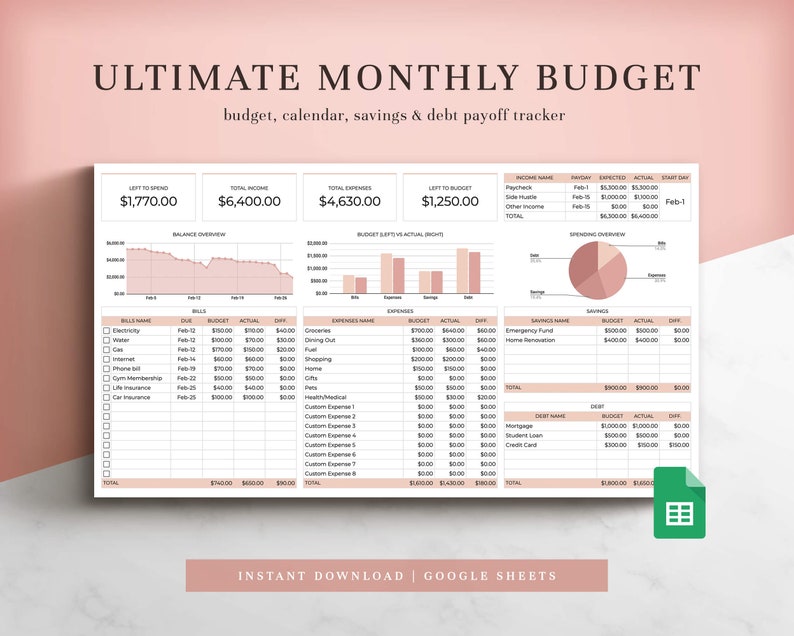
Ultimate Monthly Budget Spreadsheet for Google Sheets
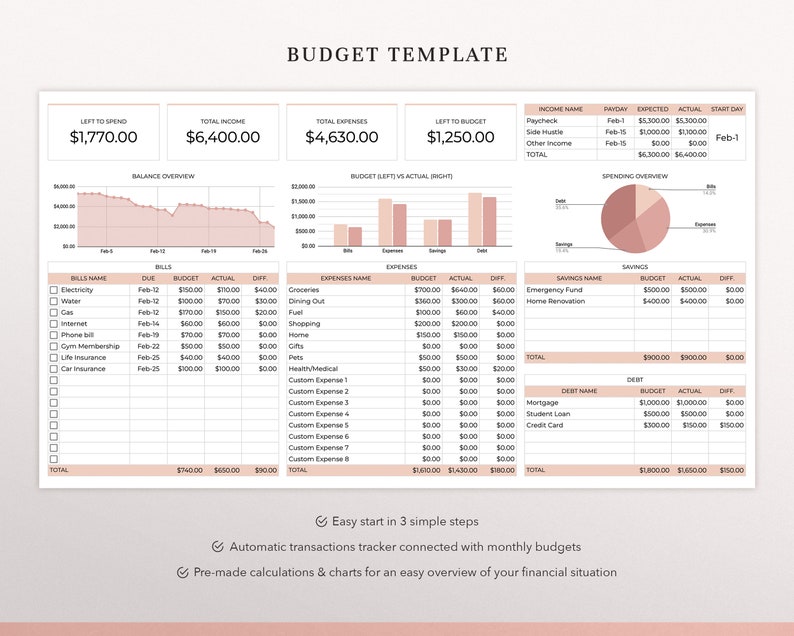
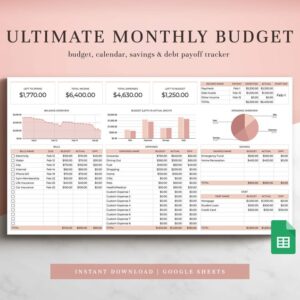
Take complete control of your finances with Coplenty’s Ultimate Monthly Budget Spreadsheet for Google Sheets. This comprehensive budget template adapts to your unique financial rhythm—whether you budget by paycheck, weekly, biweekly, or monthly. Perfect for budgeting beginners and financial experts alike, this all-in-one solution helps you track every dollar, eliminate debt, and build savings with clarity and confidence.
With intuitive design, customizable features, and complete step-by-step guidance, this spreadsheet transforms Google Sheets into your personal finance command center. No advanced spreadsheet skills required—just follow the instructions and start mastering your money today.
What’s Included: Complete Budgeting System
Core Components
- Main Budget Spreadsheet: Customizable monthly budget with categories for income, expenses, and savings
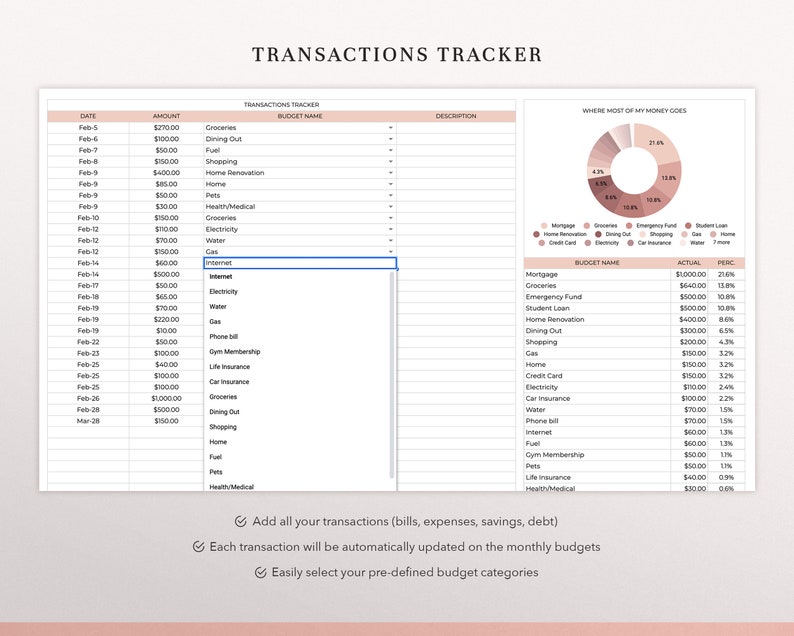
- Transactions Tracker: Log and categorize every expense with automatic categorization
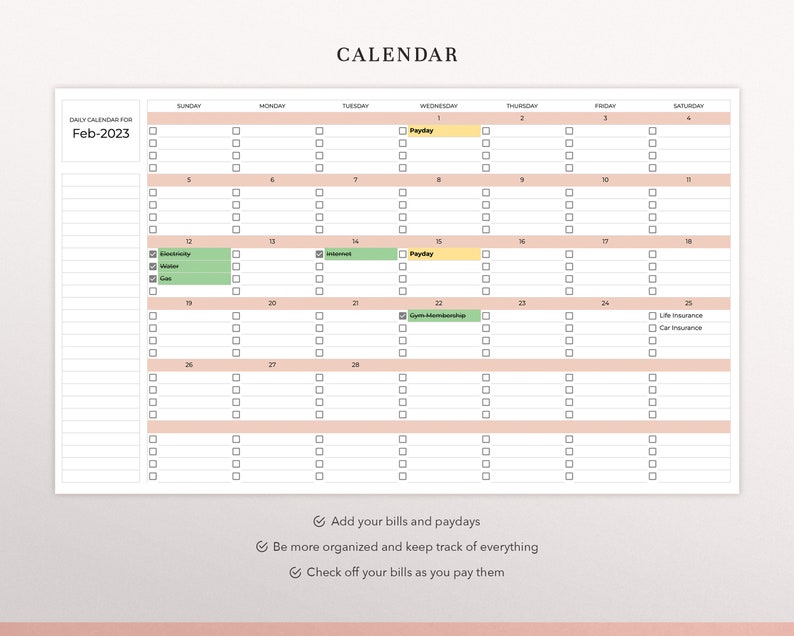
- Integrated Calendar: Visual payment schedule and bill due dates
- Savings & Debt Tracker: Monitor progress toward financial goals
- Debt Snowball Calculator: Strategic debt payoff planning with optimized payment order
- Step-by-Step Instructions: Clear guidance for setup and ongoing use
- Video Tutorials: Visual walkthroughs for every feature
- Unlimited Customer Support: Get help when you need it
Key Features & Benefits
Flexible Budgeting Methods
This spreadsheet supports every budgeting style:
- Budget by Paycheck: Align spending with each income payment
- Weekly Budgeting: Break monthly goals into manageable weekly targets
- Biweekly Planning: Perfect for those paid every two weeks
- Traditional Monthly Budget: Comprehensive monthly financial overview
- Zero-Based Budgeting: Assign every dollar a purpose each month
Smart Financial Tracking
- Automatic Calculations: Formulas update totals instantly as you enter data
- Spending Analysis: See exactly where your money goes each month
- Progress Visualization: Watch debt decrease and savings grow
- Bill Management: Never miss a payment with the integrated calendar
- Goal Tracking: Monitor specific savings targets and debt payoff milestones
Customization Options
- Change Currency: Works with dollars, euros, pounds, or any currency
- Customize Colors: Match the spreadsheet to your personal style
- Add Extra Rows: Include custom categories for your unique expenses
- Duplicate Budget Tabs: Create specialized budgets for different purposes
- Personalize Categories: Tailor expense and income categories to your life
How It Works: Simple Implementation
Getting Started (3 Easy Steps)
- Purchase & Download: Get instant access via PDF download with Google Sheets link
- Access Your Template: Click the link and make a copy to your Google Drive (free account required)
- Customize & Use: Watch the tutorial videos and begin entering your financial data
Monthly Budgeting Workflow
- Enter your income sources and amounts
- Set up spending categories based on your expenses
- Log transactions as they occur in the tracker
- Review automatic calculations and spending analysis
- Adjust next month’s budget based on actual spending patterns
- Track debt payoff and savings progress
Debt Snowball Calculator: Strategic Debt Elimination
How It Accelerates Debt Freedom
The built-in debt snowball calculator helps you:
- List All Debts: Credit cards, loans, medical bills, etc.
- Optimal Payment Order: Automatically calculates the most efficient payoff sequence
- Progress Tracking: Watch balances decrease with each payment
- Motivational Timeline: See your debt-free date based on current payments
- What-If Scenarios: Test how increased payments affect your payoff timeline
Debt Snowball vs. Debt Avalanche
The spreadsheet can be configured for either method: – Snowball Method: Pay smallest balances first for psychological wins – Avalanche Method: Pay highest interest debts first for mathematical efficiency
Who This Spreadsheet Is Perfect For
Financial Situations
- Budgeting Beginners: Simple enough for first-time budgeters
- Couples & Families: Track combined finances with shared access
- Freelancers & Gig Workers: Manage variable income effectively
- Debt Payoff Journey: Strategic planning for becoming debt-free
- Savings Goal Focus: Track progress toward specific financial targets
- Financial Restart: Recover from financial setbacks with clear planning
User Experience Levels
- Spreadsheet Novices: Video tutorials make it accessible to everyone
- Intermediate Users: Appreciate the advanced features and customization
- Financial Enthusiasts: Love the comprehensive tracking and analysis
- Mobile Users: Access your budget anywhere via Google Sheets app
Technical Details & Compatibility
Platform Requirements
- Required: Free Google account
- Primary Platform: Google Sheets (web or mobile app)
- Browser Compatibility: Chrome, Safari, Firefox, Edge
- Mobile Access: Works with Google Sheets mobile app
- No Installation: Cloud-based with automatic saves
Design & Customization
- Pre-built Formulas: All calculations automated
- Clean Layout: Intuitive organization and navigation
- Professional Design: Visually appealing while remaining functional
- Instruction Integration: Help text included throughout the spreadsheet
Upgrade Options Available
Annual Version Features
For those wanting even more comprehensive tracking:
- 12 Monthly Budget Tabs: Complete year-at-a-glance planning
- Annual Dashboard: Yearly overview with trend analysis
- Annual Totals Tracking: Complete financial year in review
- Advanced Reporting: Year-over-year comparison capabilities
Frequently Asked Questions
Do I need Excel or special software?
No, this template works exclusively with Google Sheets, which is free with any Google account. No Microsoft Office or other paid software required.
Can I use it on my phone?
Yes! Access your budget from any device with the Google Sheets app or web browser. Changes sync automatically across all your devices.
Is my financial data secure?
Your data stays in your Google Drive, protected by your Google account security. We never access your financial information.
What if I’ve never budgeted before?
Perfect! This template is designed for beginners with video tutorials and step-by-step instructions to guide you through the entire process.
Can couples share one spreadsheet?
Yes! Share the Google Sheet with your partner for collaborative budgeting. Both can enter transactions and view progress in real-time.
What if I need help setting it up?
Unlimited customer support is included. We’ll help you customize the template for your specific financial situation.
How often should I update it?
We recommend logging transactions weekly and doing a full budget review monthly. The calendar helps you stay on track with bill payments.
Compare to Other Budgeting Methods
vs. Budgeting Apps
- No Subscription Fees: One-time purchase vs. monthly app subscriptions
- Complete Control: You own and control your data
- Customization: Adjust every aspect to fit your needs
- Privacy: No third-party access to your financial information
vs. Manual Spreadsheet Creation
- Time Saving: Skip hours of spreadsheet design and formula creation
- Proven Structure: Based on effective budgeting principles
- Error Reduction: Pre-tested formulas prevent calculation mistakes
- Comprehensive Features: Includes tools you might not think to build
Why This Template Works
Psychological Design Principles
- Visual Progress: See debt decrease and savings grow
- Achievable Goals: Break large financial targets into manageable steps
- Positive Reinforcement: Celebrate small wins along your financial journey
- Reduced Anxiety: Clarity eliminates money stress
Practical Advantages
- Always Accessible: Cloud-based so you never lose your budget
- Automatic Backup: Google Drive saves every change
- Easy Updates: Simple monthly rollover process
- Growth Ready: Scales with your improving financial skills
Getting Started Guide
- Initial Setup (Day 1): Watch tutorial videos and customize categories
- First Month (Days 2-30): Enter all income and track every expense
- Month-End Review: Analyze spending patterns and adjust next month’s budget
- Ongoing Maintenance: Weekly transaction entry, monthly planning sessions
- Progress Celebration: Regularly review debt reduction and savings growth
License & Usage Rights
✅ Permitted: Personal use for you and your household. Customization for your specific needs. Ongoing updates and maintenance of your copy.
❌ Prohibited: Resale, redistribution, sharing with others beyond your immediate household, modification for commercial sale, or inclusion in other products.
All designs and content are copyrighted original creations of Coplenty. This is a digital download product delivered via instant access. No physical product will be shipped. Designed exclusively for use with Google Sheets.
Start Your Financial Transformation Today
This Ultimate Monthly Budget Spreadsheet isn’t just a template—it’s a complete financial management system that adapts to your life. Whether you’re paying off debt, saving for goals, or simply wanting clarity about where your money goes, this tool provides the structure and insights you need to succeed.
Stop guessing about your finances and start knowing. With unlimited support and a proven system, you have everything needed to take control of your money and build the financial future you want.


Jose –
Good product, i like it 🙂
Kayla –
I wish this was available via excel so I could save it to my desktop.
Kathryn –
This is simple and a beautiful product!
Erica –
Great spreadsheet for personal budgeting. Be sure to read the instruction page or watch the video. I was so excited to input all my numbers!